Android app · works on its own

Not every ride
is worth
your hour.

It reads the offer on your screen and shows what the ride really pays your hour — before your thumb moves.

Your offers never leave your phone · No sign-up · It never accepts for you

A real offer with the copilot card on top of it.
ACCEPT
43 min  ·  10.1 mi
25.79−4.04=21.75
30.35net /h

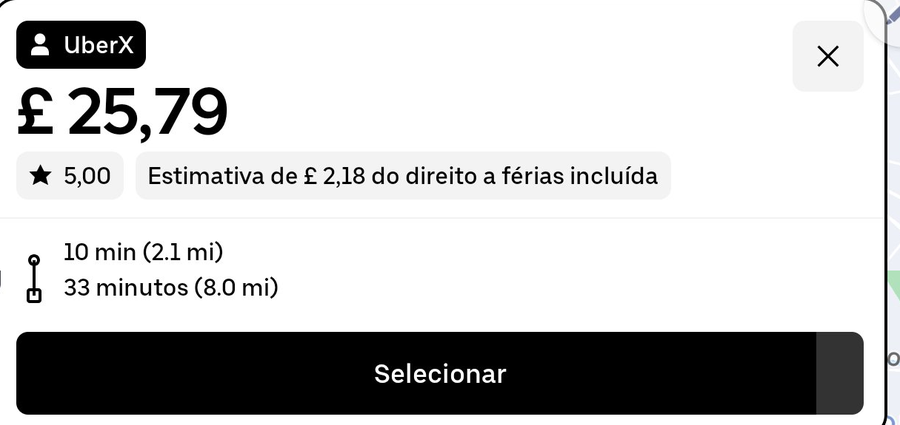
A real offer from a Monday in London. The card is the app; the screen behind it is Uber.

The apps show you the pieces.
They never add them up.

An offer gives you a fare, a time to the passenger and a time for the trip, in three separate places. It never adds them, never divides, and never takes out what the miles cost you.

One real ride, two very different numbers

  • It adds the two legs: 43 minutes, 10.1 miles
  • It takes out what those miles cost you: 10.1 × your 40p = £4.04
  • What is left after your mile cost: £21.75
  • And it divides by your time: £30.35 an hour

The fare said £25.79. Your hour says £30.35. They are not the same question.

An estimate for this one ride: the fare, minus the cost per mile you typed, over the pickup and the trip together. It leaves out waiting between rides and tax.

ACCEPT
43 min  ·  10.1 mi
25.79−4.04=21.75
30.35net /h

The whole card. Nothing else on it.

One colour, measured against your own target

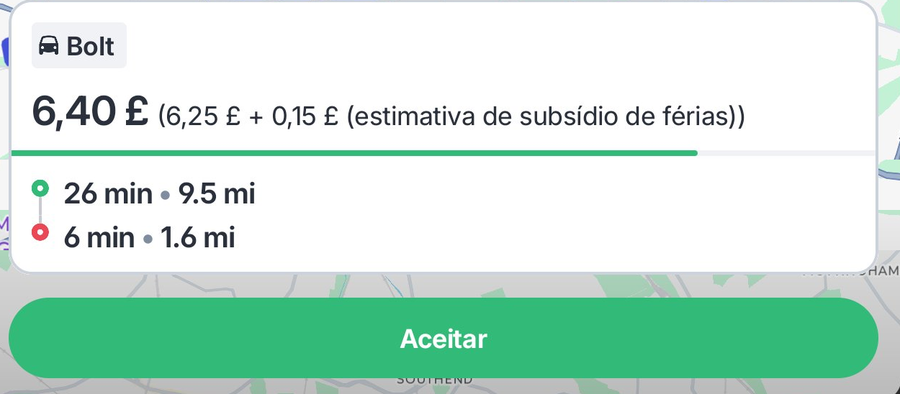
Two separate real offers: Uber in green and Bolt in red. Each is compared with the same hourly target and cost per mile.

ACCEPT
43 min  ·  10.1 mi
25.79−4.04=21.75
30.35net /h
Green — it pays for your hour £30.35 is above the £25 you asked for. Take it.
DECLINE
32 min  ·  11.1 mi
6.40−4.44=1.96
3.67net /h
Red — half an hour for £1.96 26 of those 32 minutes are spent driving to the passenger. The trip itself is 6 minutes long.

There is a third colour, amber, for an offer within 15% of your target: close, but under. Your call.

It advises — it never accepts and never declines for you. The card sits there for a few seconds and your thumb does the rest.
This is the whole app.

Three screens. Nothing to learn, nothing to fill in every day.

Two numbers, and you are set up

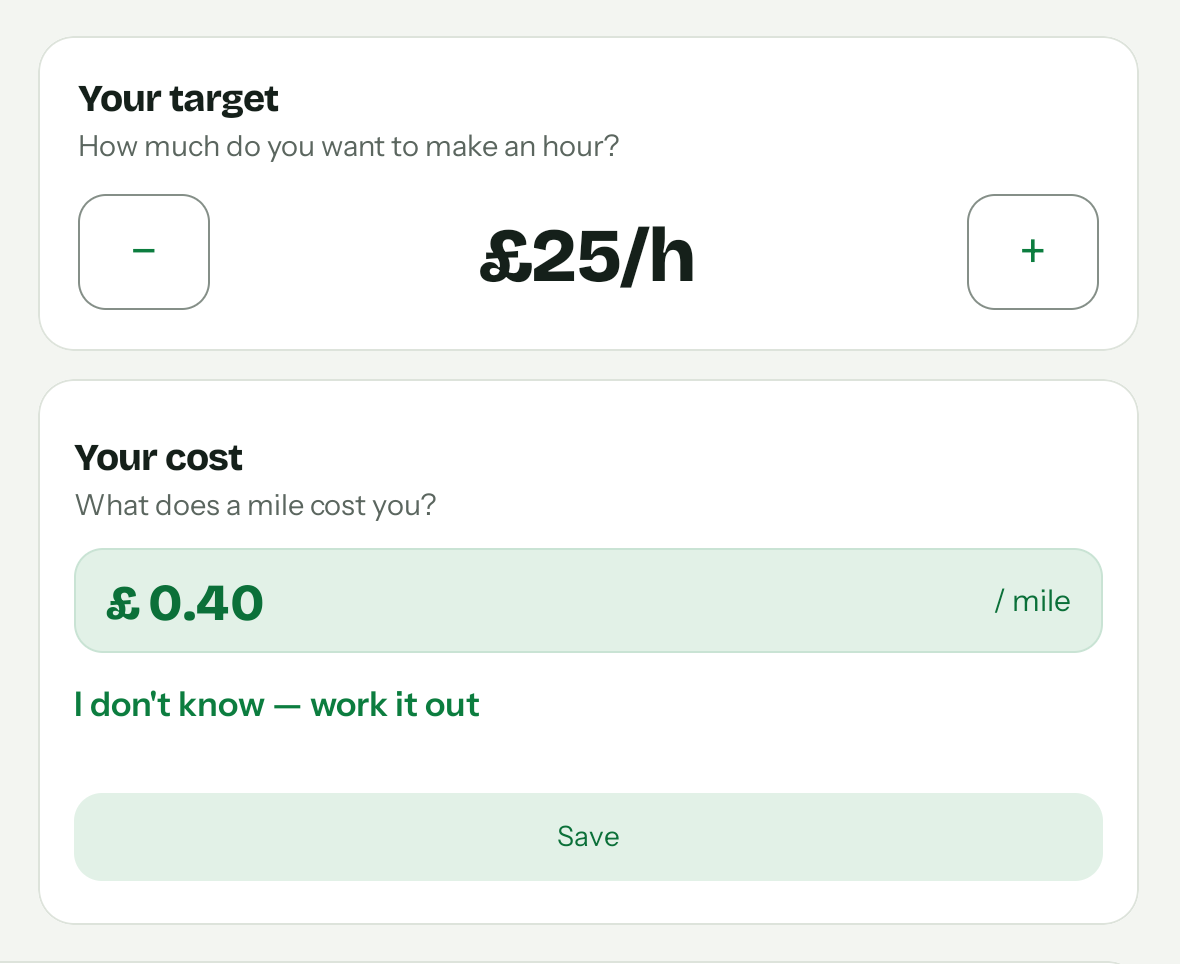
What you want to make an hour, and what a mile costs you. Everything the copilot ever says is measured against those two.

  • Don't know your cost? It works it out from three things you do know: the car per week, fuel per week, miles per week
  • The target moves in steps of £5 and saves as you tap it
  • Change either one whenever your week changes — a new car, a new fuel price
  • No login and no account — there is nothing to sign up for
The main screen: your target and your cost per mile.

The same card, on whichever app sent the offer

This one is Bolt: £6.40 for half an hour. Nothing on that screen says so.

  • 26 of the 32 minutes are the drive to the passenger
  • The 11.1 miles cost you £4.44, so £1.96 is what is left
  • The copilot does that in the second it takes the offer to appear
A real Bolt offer with the red copilot card on top of it.
DECLINE
32 min  ·  11.1 mi
6.40−4.44=1.96
3.67net /h

Set up once, then forget it is there

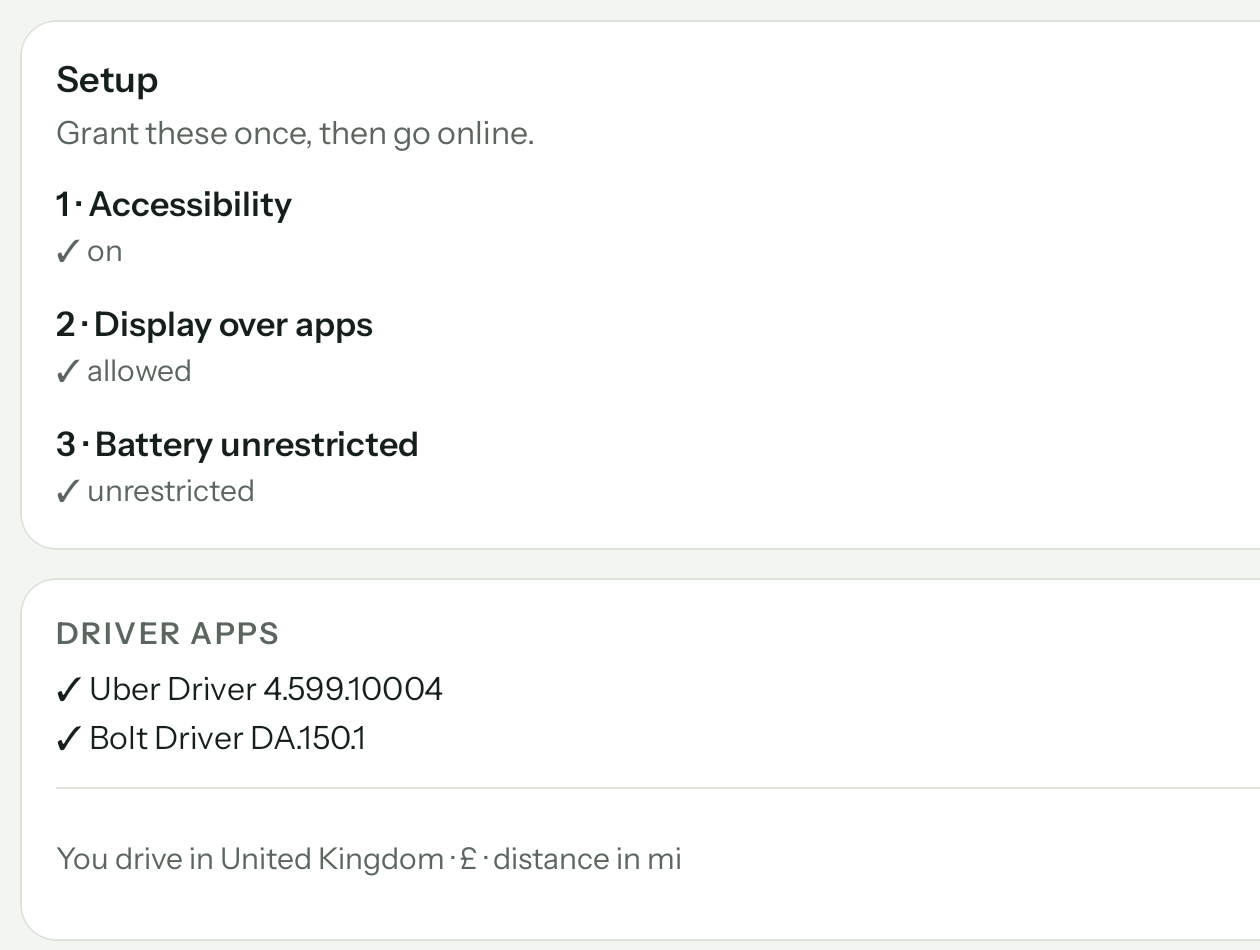
Three permissions, granted once. After that the copilot only wakes up when an offer appears, and goes quiet again.

  • It shows you which driver apps it found on your phone
  • You drag the card where you want it, once for each app, and it stays there
  • A dark screen for the night shift, even if your phone is set to light
The setup screen, with the permissions and the driver apps it found.

And when it is not sure,
it says nothing.

Reading someone else's screen is never perfect. We would rather show you no card than a wrong one, so the copilot throws away its own reading when the numbers cannot be true.

Impossible speed If the miles and the minutes work out above 75 mph, it read something wrong. No card.
A fare per mile that cannot be Under 40p or over £12 a mile, it stays quiet rather than guess.
A long trip it could not read When Uber says "more than 60 min" and the reading disagrees, you get a grey card that says LONG TRIP and no numbers at all.
Money that is not the fare Some offers print an "estimated per hour" figure next to the fare. That number is not what the ride pays, and the copilot does not mistake it for the fare.

Does it read your app?

It reads the two apps that carry most of the work in the UK. On anything else it stays silent.

✓ Uberread since day one
✓ Boltread, including the rides that run over an hour
◦ Anything elseno card — Free Now, a private job: the copilot says nothing

We only claim to read an app after we have read real offers from it. We tried Free Now and took it out: its offers do not show how long the trip takes, and we would rather show you no card than a number built on a guess.

What it needs

An Android phone or tablet — not an iPhone, because only Android lets an app read what is on another app's screen. You install it from here and switch on three things once.

What it does not do

It never accepts or declines a ride. It sends us no offers, no screens and no routes — it only checks your licence and looks for updates. And it has no account: there is nothing to sign up for.

What it costs

One red ride you did not take pays for a month of it. That is the whole business model, and we are not going to dress it up.

Right now
Free

While we are testing with a small group of drivers, so every problem gets fixed while it is still small.


After that: one TrueEarn licence, which always includes the Copilot and the Books. You buy a code for 1, 3, 6 or 12 months — not a subscription: nothing renews on its own, and nothing you set is lost if you stop. See the prices

Before you ask

Do I need an account?

No. There is nothing to sign up for and nothing to log into. You install it, type what a mile costs you, and it works — with no signal, in a tunnel, anywhere. After the free days you type a code once; still no account.

Does it work on an iPhone?

No. Reading what is on another app's screen is something only Android allows. A cheap second Android on the windscreen is what most people do.

Does it accept or decline rides for me?

Never. It shows one number and one colour on top of the offer, and your thumb does the rest. It cannot even tap the screen — the card does not let taps through, which is why you drag it out of the way of the buttons.

Why is it not on the Play Store?

Not yet. You download it from this site, and Android will ask you to allow an app from outside the store. Check the address says trueearn.co.uk before you download. If your phone shows any other warning, stop and write to us.

My app is not on your list. What now?

Then the copilot will not help you with it, and we will not pretend otherwise. It reads Uber and Bolt; on any other app it draws no card at all. If you drive for both kinds, it still works on the Uber and Bolt offers.

What does it send to us?

Nothing about your driving. The offers it photographs to do the maths are wiped every day at 4am and never leave the phone, and the app does not even ask for your location — it cannot know where you are. Two things do reach us: a number that identifies the device, with your licence code if you have one, so we can count your free days and check the licence; and a question to this site asking whether there is a newer version. There is also a button to share the log of your day, and nothing goes unless you tap it.

The other half, if you want it

The copilot decides the ride. The books decide the year.

The Books come with the same TrueEarn licence: you log what came in and what went out on the day it happens, photograph the receipt, and it hands your accountant one file at the end of the year. It needs an account, it works on an iPhone, and it never talks to the copilot — on purpose.

See the books

Stop guessing what a ride pays.
Start knowing.

Get the app

Free while we are testing · No sign-up · Your offers never leave your phone